web statistics

Archive for the ‘ Windows 7 ’ Category


Change Windows Default Ctrl Key Pressed Multi File Selection To Check Boxes In Windows 7

Friday, January 29th, 2010
Link to Change Windows Default Ctrl Key Pressed Multi File Selection To Check Boxes In Windows 7

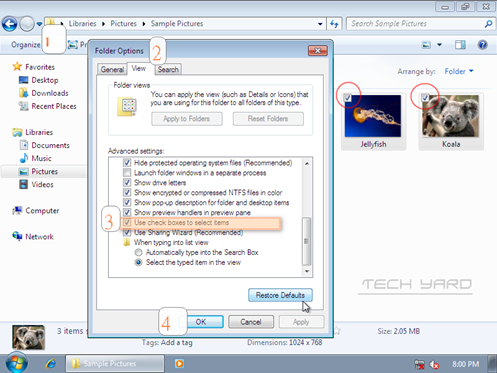
Select multiple files and folders in windows 7 using check box on mouse hovering as opposed to keeping the ctrl key pressed following these simple steps.

Create JumpLists In Windows 7 Easily Using JumpList Launcher

Thursday, December 17th, 2009
Link to Create JumpLists In Windows 7 Easily Using JumpList Launcher

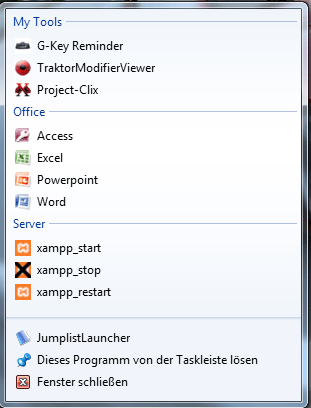
Windows 7 Jumplist Creator lets you create jumplists in Windows 7 easily from a easy to use interface, with customization and reordering of programs/files in the jumplists.It lets you add up to 60 programs or files within self-defined groups inside a jumplist.

Transform Windows XP Into Windows 7 Using 7 Mizer

Thursday, November 19th, 2009
Link to Transform Windows XP Into Windows 7 Using 7 Mizer

Transform Windows XP into Windows XP,MCE or Server 2003 into Windows 7 user interface using SevenMizer.Takes backup from the original system files and also re-modifies system files after Windows Updates and can be restored incase of problems.

VMLite XP Mode – Windows 7 XP Mode Alternative For Systems With No Hardware Assisted Virtualization Support

Sunday, November 15th, 2009
Link to VMLite XP Mode – Windows 7 XP Mode Alternative For Systems With No Hardware Assisted Virtualization Support

Run Windows XP Mode in Windows 7 on systems without Intel® Virtualization Technology or AMD-V™ feature using VMLite XP Mode that does not require hardware-assisted virtualization.

PicPick – Swiss Knife Of Portable Capture Tools

Friday, November 13th, 2009
Link to PicPick – Swiss Knife Of Portable Capture Tools

PicPick is a free, portable application that works as a screen capture tool, image editor, color picker, color palette, pixel ruler, protractor, crosshair, whiteboard and many more which can selected from the tray icon.

IdleBackup – Free, Portable and Automatic Data Backup and Data Restoration Tool

Thursday, November 12th, 2009
Link to IdleBackup – Free, Portable and Automatic Data Backup and Data Restoration Tool

IdleBackup – a free, portable data backup and data restore tool that can take backups in the background and supports 3 backup modes Mirror backup, Full zipped backup, and Sequential zipped backup.

2 Tools That Let You Set Transparency Levels in Windows With Aero Effects Disabled

Tuesday, November 10th, 2009
Link to 2 Tools That Let You Set Transparency Levels in Windows With Aero Effects Disabled

Set transparency Levels to taskbar, startmenu, desktop icons and context menu in Windows OS with Aero Effects Disabled using 2 portable tools TransTaskbar and Transparent Context Menu.

Extend NoteBook Battery Life In Windows Vista and Windows 7 Efficiently Using AeroFoil

Monday, November 9th, 2009
Link to Extend NoteBook Battery Life In Windows Vista and Windows 7 Efficiently Using AeroFoil

Aerofoil a power usage optimization tools extends Vista and Windows 7 notebook battery life by disabling some of the graphic intensive processes which create a load on processor eventually draining the battery.