Flash has become an integral part of web designing, for video clippings for sharing tutorials.If you are a wordpress user then inserting flash clips in your posts can get difficult as need to have the correct coding for inserting flash clips in your posts and also keeping coding standards in mind.
SwfObj a wordpress plugin makes inserting flash content into WordPress posts and pages same as inserting images in wordpress, shortcode can also be used while writing posts to insert flash content directly into the post.The resulting embedded Flash implements the SWFObject library for XHTML compliance and cross-browser compatibility.
Features :
- Supports all Flash param options including flashvars, and allow Fullscreen.
- Granular level of control allows easy overriding of default options.
- Generates < object > code for RSS compatibility.
- Uses SWFObject 2.1 for greater browser support.
Shortcode Example :
[ swfobj src="movie.swf" ][ swfobj src="movie.swf" height="250" width="400" ]
Installation & Settings :
- Upload to plugins folder and activate the plugin.
- Goto Settings –> SwfObj, to set height,width,alternate text,full screen enable etc.
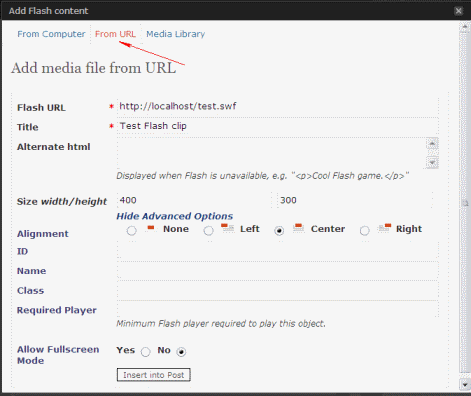

How to insert flash in post :
Click on the Flash media button above a post to upload / insert url to embed Flash media in your current post or page.
Download SwfObj


Thanks for reviewing this plugin. Please let me know if you have any suggestions for future development on it.