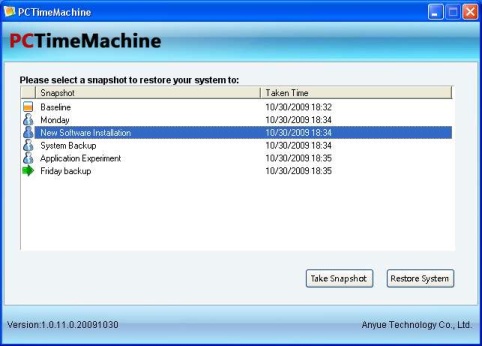
Similar to the Mac OS TimeMachine, PCTimeMachine is a free backup & system restoration tool for Windows OS that lets you revert your system back in time using system snapshots and restore your system to one previous time point to fix system problems.
Using PCTimeMachine all previous system snapshots can be easily browsed and choose any snapshot and restore your system to the snapshot in seconds.Snapshots can be taken in less than 5 sec’s and system restoration is also possible using PCTimeMachine even during system crashes.It can fix common system problems after Virus, adware, spyware infection, File Corruption, BSOD etc.,
Features :
- Support as many as 1000 snapshots
- Take less than 5 seconds to take a snapshot
- Easy to browse and delete old snapshots
- Restoration possible when you encounter system crashes
Compatible with Microsoft Windows 7 (32bit, 64bit), Windows Vista SP1+ (32bit, 64bit), Windows XP SP2+ (32bit).
Download PCTimeMachine


I badly needed it since I experiment with various applications often. Can I use as backup? How?
Thanks