• Home
  • Archives
  • Contact Us

Portable Applcation Launcher — PStart

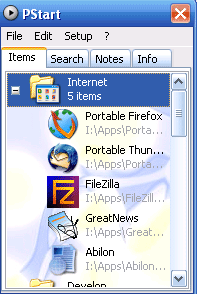
pstart_l PStart is a simple tray tool to start user defined applications.You can start anything executable from USB devices or removable disks.This can be really useful in clearing away many shortcuts from your dekstop, making it look more clean.You can create Groups, and add files and folders to it.You can also set icons to the groups you created.Search for applications, add notes and use the remind function to alert you.

Installation

Execute the installer and choose: you can install PStart to your local hard drive or a removable device.PStart uses relative paths, when installed as a portable application so you need not worry about the shortcuts to your applications on the USB drive when you change systems.

Screenshot:
pstart
For more screenshots click here.

PStart

  • Home Page
  • FAQ
  • Download from here

If you're new here, you may want to subscribe to my RSS feed. Thanks for visiting!

Want automatic updates? Subscribe to our RSS feed or Get Updates From Tech Yard by Email
tag Digg This! tag Stumble it! tag Add to Del.icio.us tag Netscape it! tag Google Bookmark It!

Related Posts:
  • Paint 2 Go : Paint.Net Portable Edition
  • 2 Free Portable Antivirus Solutions For Your USB Drives
  • Portable Archieving Tool — IZArc2Go
  • Free Download Manager Turns OpenSource
  • 6 Tips to Reduce Firefox Memory Consumption Problem
  • Be The First To Comment on: "Portable Applcation Launcher — PStart"

    Posting your Comment!


    Join in on the conversation below!

    You can use these tags: <a href="" title=""> <abbr title=""> <acronym title=""> <b> <blockquote cite=""> <cite> <code> <del datetime=""> <em> <i> <q cite=""> <strike> <strong>


    Add this blog to my Technorati Favorites!

    Enter your email address:

    Delivered by FeedBurner

    My Popular Posts

    • HotSpotSheild - Protect Your Computer In Public Wi-Fi HotSpots
    • High Quality Icons For Free Download
    • How To : Place Adsense After The First Post
    • JailBreak and Unlock Your iPhone 3G Using Pwnage Tool 2.0
    • 6 Ways To Create Heat Maps For Your Blogs
    • 3 Tools to permanently delete data from your drives
    • Get Out Of Sticky Situations By Calling Yourself
    • emTube - Play YouTube Videos On Your Nokia N95
    • How To : Place Adsense in Blogger Blogs
    • Download Norton Internet Security 2008 And Norton 360 For Free
  • RSS Guide To A Carrer Abroad

    • TOEFL : What & Who Needs To Give This Exam
    • GUIDE : How To Book Your GRE Slot
    • What Is GRE and TOEFL ?? Who Needs To Give These Exams
    • Visa Experiences
    • What To Expect On Your Way To USA ?
    • Visa Experience Fall 2008 May 20th
    • Visa Expericence May 22, 2008 Mumbai
    • Fall 2008 : Visa Experiences
    • What Are Emergency Slots ?? Availability and Who Qualifies For Them
    • Steps To Schedule A F1 Visa Interview
  • TECH YARD Copyright © 2007 | Disclaimer & Privacy Policy | Slick Blue Theme by Kyle Eslick