• Home
  • Archives
  • Contact Us

Protect Your Wordpress Blog From Brute Force Attacks

wordpress Wordpress is protected from brute force attacks, A brute force attack is to try every possible password untill login is successful in a very short time period.A new plugin called ” Login LockDown “can now protect your wordpress installation from brute force attacks.

You can set the number  of login attempts that one can make before the login from the same is disable for predetermined amount of time.This plugin records the IP address and timestamp of every failed WordPress login attempt for implementing the lockdown.The plugin defaults to a 1 hour lock out of an IP block after 3 failed login attempts within 5 minutes.This can be changed from the settings to your own choice.
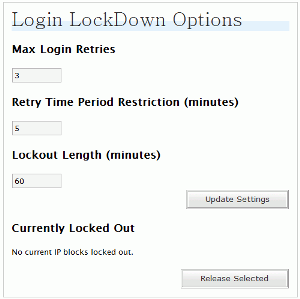
 

lockdown-settings

Download Login Lock Down from here.

Via - Sizlopedia

Technorati Tags: wordpress,wordpress plugin
Share and Enjoy:
  • Digg
  • del.icio.us
  • BlinkList
  • co.mments
  • Furl
  • Ma.gnolia
  • Netscape
  • NewsVine
  • Reddit
  • SphereIt
  • Spurl
  • StumbleUpon
  • Technorati
  • YahooMyWeb
  • blogmarks
  • Slashdot
  • description
  • E-mail this story to a friend!
  • Facebook
  • Google
  • LinkedIn
  • Live
  • Mixx
  • Print this article!
  • Propeller
  • Sphinn
  • TwitThis

If you're new here, you may want to subscribe to my RSS feed. Thanks for visiting!

1 Star2 Stars3 Stars4 Stars5 Stars (No Ratings Yet)
Loading ... Loading ...
Want automatic updates? Subscribe to our RSS feed or Get Updates From Tech Yard by Email
tag Digg This! tag Stumble it! tag Add to Del.icio.us tag Netscape it! tag Google Bookmark It!

Related Posts:
  • Add 125 x 125 AdSpots To Your Wordpress Themes
  • qTranslate - Make Your Wordpress Blog Multi-Lingual
  • Wordpress 2.5 Stable Released
  • Backup Your Wordpress/Blogger Blog Automatically Using BlogBackupr
  • Have Your Wordpress Blog In Maintenance Mode
  • Be The First To Comment on: "Protect Your Wordpress Blog From Brute Force Attacks"

    Posting your Comment!


    Join in on the conversation below!

    You can use these tags: <a href="" title=""> <abbr title=""> <acronym title=""> <b> <blockquote cite=""> <cite> <code> <del datetime=""> <em> <i> <q cite=""> <strike> <strong>


    Add this blog to my Technorati Favorites!

    Enter your email address:

    Delivered by FeedBurner

    My Popular Posts

    • HotSpotSheild - Protect Your Computer In Public Wi-Fi HotSpots
    • High Quality Icons For Free Download
    • How To : Place Adsense After The First Post
    • JailBreak and Unlock Your iPhone 3G Using Pwnage Tool 2.0
    • 6 Ways To Create Heat Maps For Your Blogs
    • Get Out Of Sticky Situations By Calling Yourself
    • 3 Tools to permanently delete data from your drives
    • How To : Add Adsense In Wordpress Blogs
    • emTube - Play YouTube Videos On Your Nokia N95
    • How To : Place Adsense in Blogger Blogs
  • RSS Guide To A Carrer Abroad

    • TOEFL : What & Who Needs To Give This Exam
    • GUIDE : How To Book Your GRE Slot
    • What Is GRE and TOEFL ?? Who Needs To Give These Exams
    • Visa Experiences
    • What To Expect On Your Way To USA ?
    • Visa Experience Fall 2008 May 20th
    • Visa Expericence May 22, 2008 Mumbai
    • Fall 2008 : Visa Experiences
    • What Are Emergency Slots ?? Availability and Who Qualifies For Them
    • Steps To Schedule A F1 Visa Interview
  • TECH YARD Copyright © 2008 | Disclaimer & Privacy Policy | Slick Blue Theme by Kyle Eslick