
hit counter

Written on March 11th, 2008 at 10:00 pm by Avinash

2 Comments

flickr

If you look out for wallpapers at Flickr, searching and saving them can be tedious.So here’s a tool called WallpaperFlickr that can get you wallpapers from Flickr based the tags you mention or based on the username.
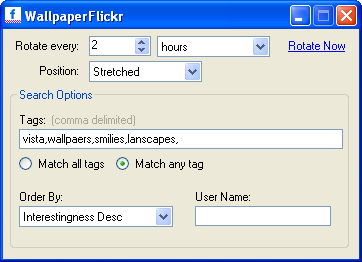
WallpaperFlickr-options

You can have it rotate the wallpaper at regular intervals, like once a day for example.

You can mention the position of the random wallpaer

Requirements:

Download WallPaperFlickr from here.

Technorati Tags: ,

Related Posts:

  • Get Any Flickr Photo In Higher Resolution
  • You can have a higher resolution image of any Flickr Photo using FlickrGetHigh extension in FireFox that lets you view the largest available resolution of
  • Watch Non-Stop YouTube Videos Continuously
  • Do you watch YouTube videos, but the problem is that you cannot create a playlist of videos. Infinitube is a new webapp that lets
  • Firefox Wallpapers
  • If you are hardcore Firefox fan and want to have a Firefox wallpaper then here’s a collection of Firefox wallpapers.So Hurry enjoy these Wallpapers and
  • Phreetings - Send EGreeting Cards Using Flickr Photos
  • Phreeting allows you to create and send online greeting cards using images from flickr.Just enter your keywords and then drag and drop the image into
  • 150 Free Icons From PixelResort
  • Michael Flarup of PixelResort has released a developer icon set of 150 32x32 icons called Pixelicious in celebration of his new site.Download


  • Delicious, Digg, Mixx, Reddit, Stumble Upon, Technorati
    SocialTwist Tell-a-Friend

    2 Responses to “Set Random Images From Flickr As WallPapers”

    1. This is useful tool for wallpaper junkies out there. Also someone may want to check this article written a little ago about John Backgroun Switcher.

      http://www.inspiredgeek.com/2008/02/20/a-powerful-desktop-background-switcher-for-windows-that-supports-flickr-picasa-other-online-photo-sharing-services/

      It is always good to have choice in software :)
      Jawwad @ Inspired Geek’s last blog post..An Easy Way of Tidying up Your Cluttered Start Menu in Windows

    2. Jawwad @ Inspired Geek » Thats a really great tool, Thanks for sharing with us.

    Leave a Comment